How to Use Google Ads for Retail Stores: A Practical Guide for 2026
Quick Answer
Google Ads lets retail stores show up exactly when local customers are searching for what they sell. For brick-and-mortar stores, the biggest advantage is location targeting, you can limit your ads to people within a specific radius of your store, so every dollar goes toward reaching nearby buyers. Set up properly, Google Ads can drive both online sales and physical foot traffic.
Key Takeaways
- Google Ads can be targeted to a specific radius around your store, so you only pay to reach people who can actually visit
- Shopping campaigns now run mostly through Performance Max, which serves ads across Search, YouTube, Display, and more from one campaign
- Start with one focused keyword phrase and one landing page, not ten of each
- Month one is data collection. Month two is refinement. Month three is scaling
- A clean product feed in Google Merchant Center is the foundation of any retail Shopping campaign
- Local Inventory Ads show nearby stock with "pick up today" messaging, powerful for driving in-store visits
- Track everything: form fills, phone calls, and store visits, or you are making decisions blind
- A small daily budget can work if it is focused. Spreading a small budget too wide wastes it
What Are Google Ads and How Do They Work for Retail Stores
Google Ads puts your store in front of people who are actively searching for what you sell. When someone types "running shoes near me" or "hardware store open now," Google decides which ads to show based on relevance, bid, and quality.
For retail stores, there are two main ad types worth knowing:
- Search Ads, text ads that appear in Google search results
- Shopping Ads, product image ads showing price, product name, and store name
Shopping campaigns now run primarily through Performance Max, which uses your product feed from Google Merchant Center to serve ads across Search, Shopping, YouTube, Display, and more, all from a single campaign.
How to Use Google Ads for Retail Stores Step by Step
Most people set this up wrong. They launch too many keywords, send traffic to their homepage, and wonder why nothing converts.
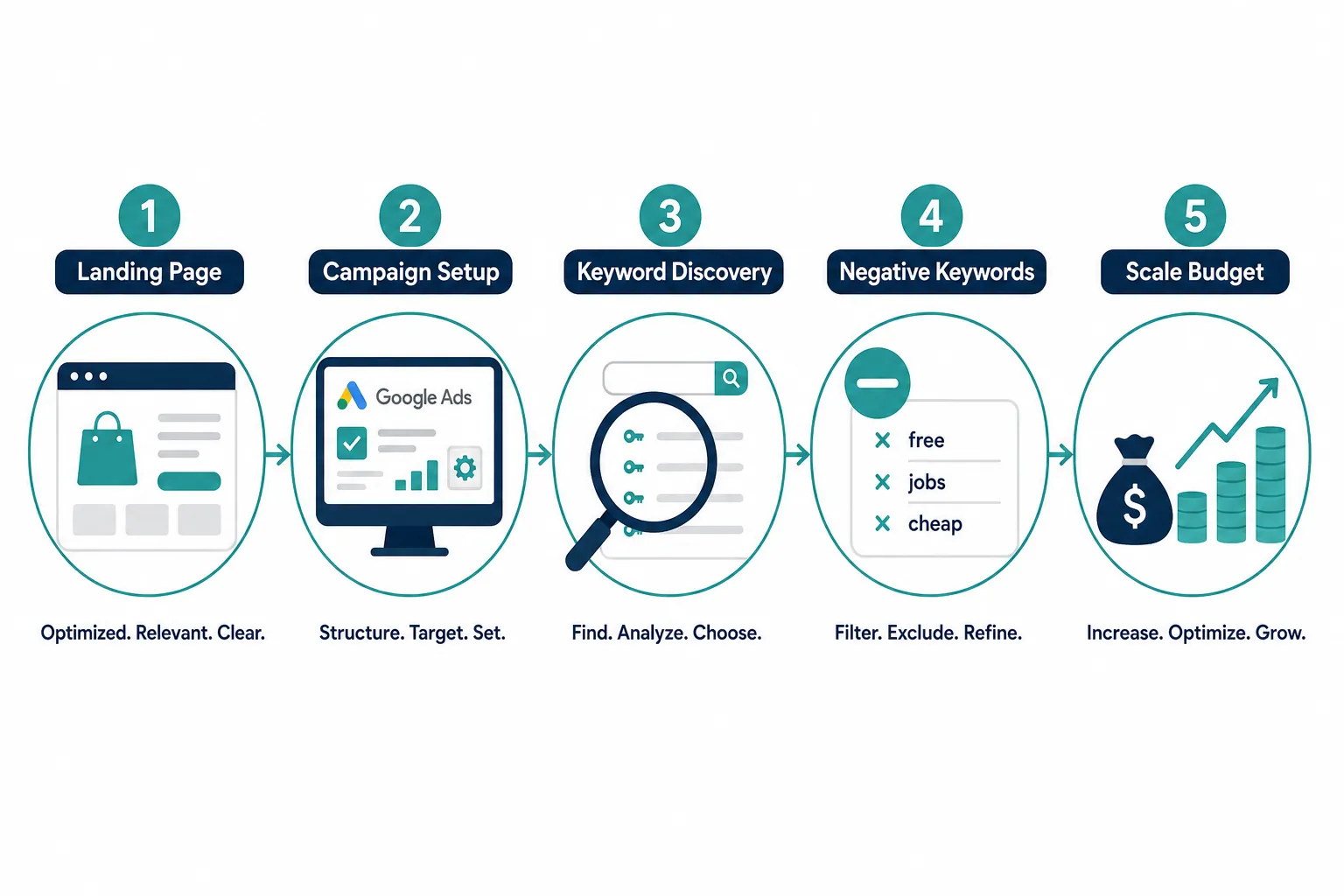
Here is the process that actually works:
Step 1, Build a dedicated landing page
Your website is for browsing. A landing page is for converting. Keep it simple: logo top left, phone number top right, a clear call-to-action button in a contrasting color, and a short form at the bottom. When someone fills out the form, send them to a thank-you page, that is how you track leads cleanly.
Step 2, Set up your campaign with one core phrase
Start broad with one main search term. For example, if you sell furniture in Dallas, start with "furniture store Dallas." Google will expand from there and show you what people are actually searching. That is the data you need.
Step 3, Set your location radius
This is where most retail owners miss a huge opportunity. In Google Ads, you can target ads to a specific radius around your store, down to a few kilometres or miles. You are not paying to reach someone three cities away who will never walk through your door.
Step 4, Review search terms after month one
After 30 days, look at what people actually typed, not just the keywords you set, but the real search terms. Find the ones that generated leads. Build specific ad groups and landing pages around those.
Step 5, Cut what is not working, scale what is
Add negative keywords for anything irrelevant. Then increase your daily budget on what is proven. Do not increase cost-per-click, increase daily spend.
What Is the Difference Between Google Shopping Ads and Search Ads for Retail
Search Ads are text-based and show when someone types a query. Shopping Ads show a product image, price, and store name, they are visual and appear at the top of results.
For retail stores selling physical products, Shopping Ads often outperform Search Ads because buyers can see the product before clicking. Shopping campaigns drive around 76.4% of US retail search ad spend, and Google now recommends running them through Performance Max rather than standalone Shopping campaigns.
| Ad Type | Best For | Requires |
|---|---|---|
| Search Ads | Services, local intent | Keywords, ad copy |
| Shopping Ads | Physical products | Merchant Center feed |
| Performance Max | Both, at scale | Product feed + assets |
| Local Inventory Ads | In-store stock | Local inventory feed |
How to Target Local Customers with Google Ads
This is one of the most underused features for retail stores. Google Ads lets you set a geographic radius around your store location, so your ads only show to people nearby.
Connecting your Google Business Profile to your ads and using location extensions can raise mobile click-through rates noticeably, because users see your distance and opening hours directly in the ad.
A few practical targeting options:
- Set a 5-10 km radius around your store address
- Target by suburb, postcode, or city
- Exclude areas you cannot service
- Use "presence" targeting, only show ads to people physically in that area, not just interested in it
Local Inventory Ads take this further. They show shoppers nearby that you have a specific product in stock right now, with a "pick up today" badge. This bridges the gap between online search and in-store visits.
How Much Does It Cost to Run Google Ads for a Retail Business
There is no fixed cost, you set your own daily budget. But budget size matters more than most people realise.
Spreading a small budget across too many keywords and locations means none of them get enough traffic to generate data or results. A focused small budget beats a scattered large one every time.
A practical starting point for a local retail store is roughly $15-20 per day per location to maintain enough frequency within a local radius. That is an estimate based on local retail guidance, your market will vary.
What to keep in mind:
- Month one is investment, not profit, you are buying data
- Month two you refine based on what converted
- Month three you scale the budget on what is proven
Can Google Ads Work for Small Retail Businesses with a Low Budget
Yes, but only if the budget is focused. Small budgets fail when spread too wide.
Pick one location. One product or service category. One landing page. Let Google collect data on that before expanding. A small retailer trying to compete across ten keyword themes with a $10/day budget will see nothing. The same budget focused on one phrase in one suburb can absolutely generate leads.
The key rule: measure quickly, cut fast, focus on what works.
Why Are My Google Ads Not Getting Clicks for My Retail Store
A few common reasons:
- Your ad is not relevant enough, the ad copy does not match what someone searched
- Your bid is too low, you are not competitive enough to show in a visible position
- Your targeting is too broad or too narrow, either reaching the wrong people or not enough of them
- Your quality score is low, Google rewards ads that match the landing page content. If your ad says "black running shoes" but lands on a general homepage, your score drops
The fix starts with data. Look at your impression share first. If you are getting impressions but no clicks, it is an ad copy problem. If you are barely getting impressions, it is a bid or targeting problem.
How to Track Sales from Google Ads in Your Store
Tracking is not optional. Without it, you are guessing.
For retail stores, there are three things to track:
- Form submissions, send completed forms to a thank-you page and count arrivals on that page as leads
- Phone calls, use a tracked phone number that changes based on which ad is running, so you know which keyword drove the call
- Store visits, Google can track when someone clicks your ad and then visits your physical store, using location data
One important note for 2026: the older method of importing offline click conversions via the Google Ads API has been retired for new adopters. The current path is through Google's Data Manager API for offline measurement. If you are working with an agency, make sure they are using the current setup.
Google Ads vs Facebook Ads for Retail Stores, Which Is Better
They work differently. Neither is universally better.
Google Ads captures demand, someone is already searching for what you sell. That intent makes it powerful for retail.
Facebook Ads creates demand, you show ads to people who are not searching, but match a profile. Better for brand awareness and new product launches.
For most retail stores, Google Ads is the stronger starting point because you are reaching buyers who are ready to act. Facebook can complement it once Google is working.
Do I Need Google Ads If I Already Have a Website
Having a website does not mean people can find it. Organic search (SEO) takes months to build. Google Ads puts you in front of buyers today.
The other benefit: running Google Ads first actually helps your SEO. You discover which search terms convert, not just which ones bring traffic. Once you know a term generates leads in paid search, you know it is worth targeting organically too.
Best Practices for Google Ads Retail Store Campaigns
Keep these in mind from day one:
- One landing page per ad group, match the ad message to the page content
- Use a tracked phone number, never a personal mobile, it looks unprofessional and you lose the data
- Review search terms weekly in month one, that is where the real insights are
- Add negative keywords early, cut irrelevant traffic before it drains budget
- Connect your Google Business Profile, it adds location and hours to your ads automatically
- Do not ignore video assets, Performance Max campaigns that include short vertical video assets have shown lower cost per store visit compared to static images alone
How Long Does It Take to See Results from Google Ads for Retail
Expect a three-month process before you have reliable data to scale from.
Month one: discovery. You are collecting data, not optimising yet.
Month two: refinement. You know which search terms convert. You build focused ad groups around them.
Month three: scaling. You increase daily budget on what is proven. You start seeing a real return.
Anyone promising instant results is not being straight with you. The data is the truth, and it takes time to collect it.
Common Mistakes People Make with Google Ads for Retail Stores
These come up repeatedly:
- Sending traffic to the homepage, too many distractions, no clear action
- Too many keywords from day one, spreads budget thin, generates no useful data
- Not tracking conversions properly, making decisions on bad information
- Ignoring search terms, keywords are what you set; search terms are what people actually typed. The difference matters
- Letting calls go to voicemail, if someone calls from an ad and hits voicemail, they move on to the next result. That lead is gone
- Stopping too early, most people quit in month one before the data is useful
Conclusion
Google Ads works for retail stores. But it works best when it is focused, tracked, and given time to generate real data.
Start with one location, one landing page, and one core search phrase. Set your radius targeting so you only reach people who can actually visit your store. Track every lead, form fills, calls, and store visits.
Month one is about learning. Month two is about refining. Month three is about scaling what works.
The data will tell you exactly what to do next. Trust it.
If you want help tracking your ad performance and understanding what is actually driving results, explore the dashboard at Opal44 or get in touch directly to talk through your setup.
FAQ
Can I run Google Ads for just my local area?
Yes. Google Ads lets you target a specific radius around your store address, down to a few kilometres. You only pay to reach people who are close enough to visit.
Do I need a Google Merchant Center account for Shopping Ads?
Yes. Shopping Ads and Performance Max retail campaigns require a product feed in Google Merchant Center. Without it, you can only run Search Ads.
What is Performance Max for retail?
Performance Max is Google's campaign type that uses your product feed and creative assets to serve ads across Search, Shopping, YouTube, and Display, all from one campaign.
How do Local Inventory Ads work?
Local Inventory Ads show nearby shoppers that you have a specific product in stock, with a "pick up today" badge. They require a local inventory feed connected to your Merchant Center account.
What is a negative keyword?
A negative keyword tells Google not to show your ad for that search term. For example, a furniture store might add "free" as a negative keyword to avoid people searching for free furniture.
How do I know if my Google Ads are actually working?
Track conversions, form submissions, phone calls, and store visits. If you are not tracking these, you cannot know what is working. Set up a thank-you page for form completions and use a tracked phone number for calls.
Should I use broad match or exact match keywords?
For month one, broad match on a single core phrase works well. It lets Google find search terms you would not have thought of. After month one, use those findings to build exact or phrase match ad groups around proven converters.
What happens if I stop my Google Ads?
Traffic stops immediately. Unlike SEO, there is no lasting effect once you pause. That is why using Google Ads data to also build your organic search presence is a smart long-term move.
References
[1] Retail - https://developers.google.com/google-ads/api/performance-max/retail
[3] Google Ads Negozi Locali Guida 2026 - https://andreaverderone.com/blog/google-ads-negozi-locali-guida-2026
[6] Google Ads Retail Ecommerce Shopping Campaigns Guide 2026 - https://roa-marketing.com/blog/google-ads-retail-ecommerce-shopping-campaigns-guide-2026/
[8] Google Ads 2026 Changes - https://www.visioncoursemedia.com/resources/digital-marketing-guides/google-ads-2026-changes/
[10] Ads Decoded S1e6 - https://business.google.com/us/accelerate/podcasts/ads-decoded-s1e6/
Other frequently asked questions
- How Do I Check Which Pages People Spend the Most Time On
- How Do I Track Sales From My Google Ads Campaigns
- Will AI Take Over Data Analytics
- How Do I Track Phone Calls or Email Clicks as Conversions
- How Do I Track How Many People Fill Out My Contact Form
- How Do I Track How Many People Watch a Video or Download a Brochure
- How Do I Know Which Pages Lead to the Most Conversions
- How Do I See Where Most People Drop Off During Checkout
- How Do I See Where My Website Visitors Are Coming From
- How Do I See Which Blog Posts Bring Me the Most Visitors
- How Do I Check if My Homepage Is Actually Performing Well
- How Do I Find Out How Long It Takes Someone to Become a Customer
- How Do I Find Out What Paths People Take Before They Buy or Sign Up
- How Do I Measure Which Traffic Source Brings the Most Paying Customers
- How Do I See if Discounts or Offers Increase Sales
- How to See What Visitors Do First When They Land on Your Site