How Do I Know If My Google Ads Traffic Is Converting Into Sales?
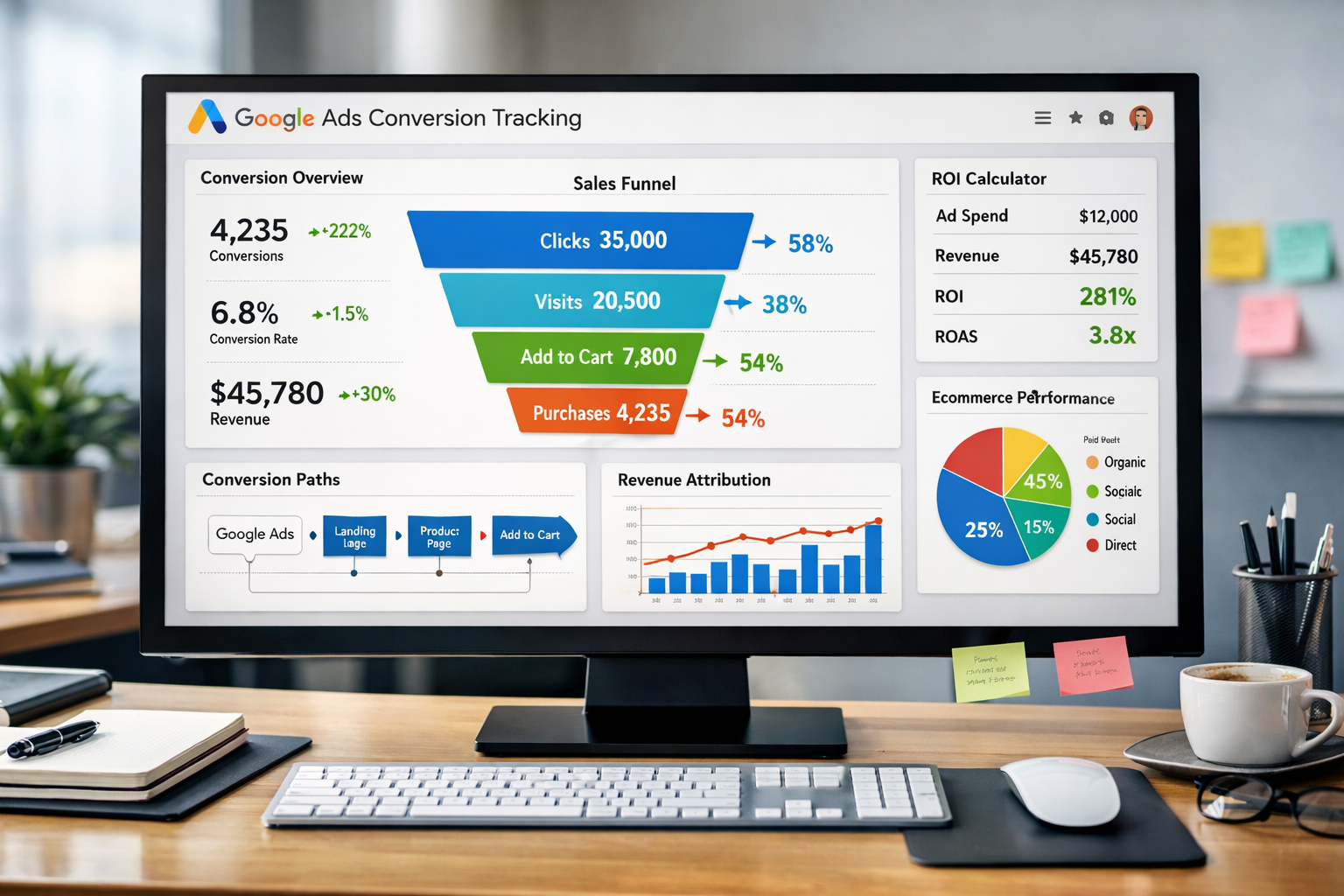
You're spending money on Google Ads. Traffic is coming to your site. But here's the question that keeps you up at night: is any of it actually turning into sales?
This isn't a theoretical problem. Every click costs money. And if you can't connect those clicks to actual revenue, you're flying blind. The good news? Figuring out whether your Google Ads traffic is converting into sales is simpler than most people think. You just need to look in the right places.
Key Takeaways
- Conversion tracking is essential - Without proper setup in Google Ads and Google Analytics, you're guessing about sales performance
- Multiple metrics matter - Conversion rate, cost per conversion, and revenue per click tell the complete story
- Attribution shows the path - Understanding how ads contribute to sales helps you make smarter budget decisions
- Regular monitoring prevents waste - Weekly checks catch problems early and identify winning campaigns
- Test and refine constantly - Small improvements in tracking and targeting compound into significant revenue gains
The Simple Truth About Google Ads Traffic Is Converting Into Sales
Most business owners make this harder than it needs to be.
They look at impressions. They check clicks. They see traffic numbers going up. But they never actually connect the dots to sales.
Here's what matters: Did someone click your ad and then buy something?
That's it. That's the core question.
Everything else is just helping you answer that question more accurately.
Setting Up Conversion Tracking (The Foundation)
You can't know if Google Ads traffic is converting into sales without conversion tracking. Period.
This is where most people get stuck. They think it's complicated. It's not.
What You Need to Track
Track the moment money changes hands.
For ecommerce, that's a purchase confirmation. For service businesses, it might be a form submission or phone call. For SaaS, it could be a trial signup or subscription.
Pick the action that leads directly to revenue.
How to Set It Up
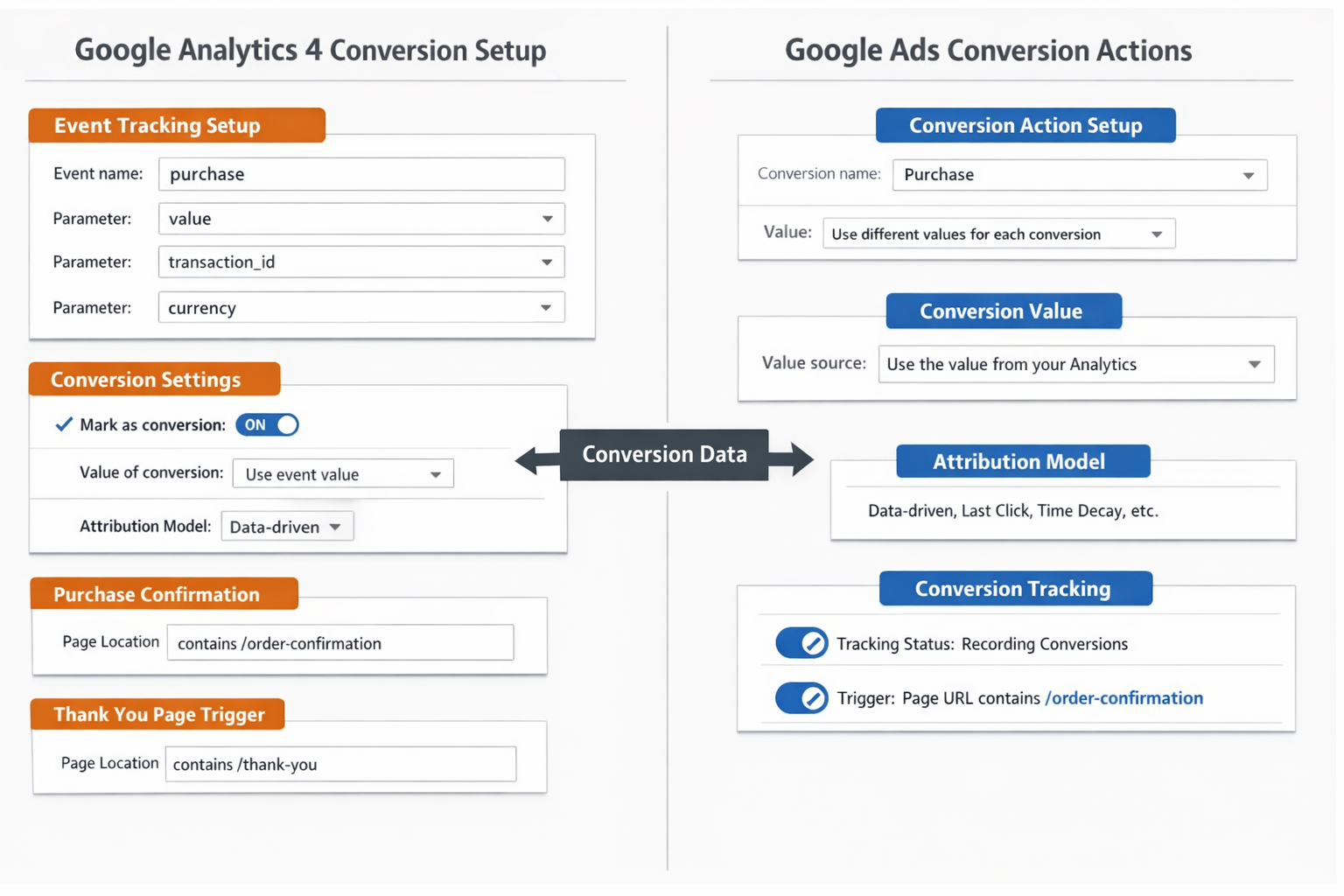
Google Ads has a conversion tracking tag. It's a small piece of code that goes on your "thank you" page.
When someone completes a purchase and lands on that page, the tag fires. Google Ads records the conversion. Now you know that specific click led to a sale.
If you're using Google Analytics 4, you can import those conversions directly into Google Ads. This creates a seamless connection between your analytics and your ad platform.
The dashboard approach makes this monitoring process significantly easier once everything is connected properly.
The Three Numbers That Tell You Everything
Once tracking is live, three numbers tell you whether your Google Ads traffic is converting into sales.
Conversion Rate
This is the percentage of clicks that turn into sales.
If 100 people click your ad and 3 buy something, that's a 3% conversion rate.
Industry averages vary wildly. Ecommerce might see 1-3%. High-ticket services might see 5-10%. Don't obsess over benchmarks. Focus on your own trend line.
Is it going up or down? That's what matters.
Cost Per Conversion
Divide your ad spend by the number of conversions.
If you spent $500 and got 10 sales, your cost per conversion is $50.
Now ask yourself: Can you afford to pay $50 to acquire a customer?
If your average order value is $200, probably yes. If it's $40, definitely not.
This number tells you if the economics work.
Return on Ad Spend (ROAS)
This is revenue divided by ad spend.
If you spent $1,000 on ads and generated $4,000 in sales, your ROAS is 4:1. For every dollar spent, you made four dollars back.
Most profitable businesses aim for at least 3:1 or 4:1 ROAS. But this depends entirely on your margins.
A business with 80% margins can survive on lower ROAS than one with 20% margins.
How to Actually Check If Google Ads Traffic Is Converting Into Sales
Here's the step-by-step process to see what's working.
Inside Google Ads
Go to your Google Ads account. Click on "Campaigns" in the left menu.
Add the "Conversions" column if it's not already there. This shows you exactly how many conversions each campaign generated.
Sort by conversions. The campaigns at the top are your winners. The ones at the bottom might be wasting money.
Now click into individual campaigns. Look at ad groups. Look at keywords. Look at specific ads.
You're looking for patterns. Which keywords drive sales? Which ads get clicks but no conversions?
Inside Google Analytics 4
Google Analytics shows you what happens after the click.
Go to Reports > Acquisition > Traffic Acquisition. Filter by "Google Ads" as the source.
Look at the conversion metrics. You'll see sessions, engagement rate, and conversions all in one place.
But here's the powerful part: You can see the user journey.
Did they visit once and buy immediately? Or did they come back three times before purchasing? This context helps you understand how Google Ads fits into your overall sales process.
The Attribution Question
Not every sale happens on the first click.
Someone might click your ad, leave, come back through organic search, and then buy. Google Ads played a role, but it wasn't the last touchpoint.
Google Analytics uses different attribution models to assign credit. The default is "data-driven attribution," which uses machine learning to distribute credit across touchpoints.
Understanding this helps you see the true value of your Google Ads traffic beyond last-click conversions.
Common Signs Your Google Ads Traffic Is Converting Into Sales (Or Not)
You don't always need to dig into complex reports. Sometimes the signs are obvious.
Good Signs
Your revenue is growing consistently. Month over month, sales are up, and Google Ads spend is stable or growing proportionally.
Specific campaigns show clear ROI. You can point to individual campaigns and say, "This one generated $X in sales from $Y in spend."
Conversion rates are stable or improving. Even if traffic fluctuates, the percentage of visitors who buy stays consistent.
Customer acquisition cost makes sense. You know exactly how much it costs to acquire a customer through Google Ads, and it's profitable.
Warning Signs
Traffic is up, but sales are flat. You're getting more clicks but the same number of conversions. This means quality is dropping.
High bounce rates on landing pages. People click your ad and immediately leave. The traffic isn't relevant or the landing page doesn't match the ad promise.
Conversions tracked, but no revenue increase. Sometimes tracking is set up incorrectly, counting actions that don't actually lead to sales.
Cost per conversion is rising. You're paying more for each sale over time, which erodes profitability.
If you're seeing these warning signs, it's time to contact someone who can help diagnose the problem before you waste more budget.
The Weekly Check-In That Prevents Disasters
Don't wait for monthly reports. Check weekly.
Every Monday, look at the previous week's performance. It takes 10 minutes.
What to Check
- Total conversions - Did you hit your target?
- Cost per conversion - Is it within your acceptable range?
- ROAS - Are you making money or losing it?
- Any major changes - Did a campaign suddenly stop converting?
This weekly habit catches problems early. If a campaign that normally converts 10 times per week suddenly shows zero conversions, you know something broke.
Maybe the tracking tag stopped working. Maybe the landing page went down. Maybe Google changed something in your account.
Weekly checks mean you catch it in days, not months.
Advanced: Knowing Which Google Ads Traffic Is Converting Into Sales
Not all Google Ads traffic is equal.
Some campaigns drive high-intent buyers. Others bring tire-kickers.
Segment by Campaign Type
Search campaigns typically convert better than Display. Shopping campaigns often outperform both for ecommerce.
Look at each campaign type separately. Don't lump everything together.
Segment by Device
Mobile traffic might convert differently than desktop. For some businesses, mobile converts better. For others, desktop dominates.
If mobile has a terrible conversion rate, you might need a better mobile experience. Or you might need to bid less on mobile traffic.
Segment by Location
If you're targeting multiple cities or countries, check performance by location.
One city might be wildly profitable while another loses money. This tells you where to focus your budget.
Segment by Time
Do conversions happen more on weekdays or weekends? Morning or evening?
You can adjust your bid schedule to spend more when conversions are most likely.
What to Do When Google Ads Traffic Isn't Converting Into Sales
Let's say you've set up tracking. You're monitoring the numbers. And the truth is ugly: conversions are low or nonexistent.
Don't panic. This is fixable.
Check Your Tracking First
Before changing anything in your campaigns, verify that tracking actually works.
Make a test purchase yourself. Did it show up in Google Ads as a conversion?
If not, your tracking is broken. Fix that before doing anything else.
Review Your Landing Pages
Click your own ads. Where do they send you?
Is the landing page relevant to the ad? Does it load quickly? Is the call-to-action clear?
Most conversion problems live on the landing page, not in the ad itself.
Examine Your Keyword Match Types
Broad match keywords can bring irrelevant traffic. If your conversion rate is terrible, you might be paying for clicks from people who have no intention of buying.
Shift to phrase match or exact match. Tighten your targeting.
Look at Your Offer
Sometimes the problem isn't the ads or the landing page. It's the offer itself.
Is your price competitive? Is your value proposition clear? Do people actually want what you're selling?
Google Ads can drive traffic, but it can't make people want something they don't need.
Consider Professional Help
If you've tried everything and conversions still aren't happening, it might be time to bring in someone who's done this before.
The signup process for professional tools and services can often identify issues that aren't obvious to someone running their first few campaigns.
Connecting Google Ads to Your Overall Business Goals
Here's something most people miss: Google Ads traffic converting into sales is just one piece of your business.
You need to know not just if ads are converting, but if they're contributing to profitable growth.
Customer Lifetime Value
A customer who buys once for $50 is different from one who buys every month for two years.
If Google Ads brings in customers with high lifetime value, you can afford to pay more for that initial acquisition.
Track this over time. Which campaigns bring one-time buyers versus repeat customers?
Margin Considerations
A $1,000 sale with 10% margin gives you $100 in profit. A $200 sale with 50% margin gives you $100 in profit.
Don't just look at revenue. Look at actual profit per conversion.
This changes which campaigns are actually worth running.
Business Capacity
If you're a service business, can you actually handle more customers?
Sometimes the answer is no. In that case, you might want conversions to stay steady while you increase prices or improve efficiency.
Google Ads isn't always about getting more sales. Sometimes it's about getting the right sales at the right price.
The Long-Term View: Trends Matter More Than Daily Fluctuations
One bad day doesn't mean your Google Ads traffic isn't converting into sales.
Look at trends over weeks and months.
Seasonal Patterns
Most businesses have seasonal fluctuations. Retail spikes in November and December. Tax services peak in March and April.
Compare this month to the same month last year, not to last month.
Market Changes
Sometimes conversion rates drop because the market changed. New competitors entered. Economic conditions shifted. Customer behavior evolved.
This doesn't mean your ads stopped working. It means you need to adapt.
Testing and Optimization
Small improvements compound over time.
Improving your conversion rate from 2% to 2.5% might not seem like much. But over a year, that's 25% more sales from the same traffic.
Keep testing. Keep refining. The goal isn't perfection today. It's steady improvement over time.
Tools That Make Tracking Easier
You don't need expensive software to know if Google Ads traffic is converting into sales.
Google Ads and Google Analytics are free and powerful.
But a few additional tools can help:
Google Tag Manager
This makes it easier to manage tracking codes without constantly editing your website.
You can set up conversion tracking, event tracking, and more, all from one interface.
Call Tracking Software
If phone calls are part of your sales process, call tracking software shows which Google Ads campaigns drive phone conversions.
CRM Integration
Connecting Google Ads to your CRM shows you not just which ads drive leads, but which ads drive deals that actually close.
This is especially valuable for businesses with longer sales cycles.
The key is choosing tools that actually get used. Simple and consistent beats complex and abandoned.
Making Decisions Based on What You Learn
Data without action is useless.
Once you know which Google Ads traffic is converting into sales, make changes.
Double Down on Winners
If a campaign is profitable, increase its budget. If a keyword is converting well, bid more aggressively on it.
This sounds obvious, but many people spread their budget evenly instead of concentrating it where it works.
Cut or Fix Losers
If a campaign hasn't generated a conversion in 30 days and has spent a reasonable amount, pause it.
Don't keep throwing money at something that doesn't work.
Either fix it (new ads, new landing page, new targeting) or move that budget to campaigns that are working.
Test Systematically
Don't change everything at once. Test one variable at a time.
New headline. New landing page. New audience.
This way you know what actually made the difference.
Conclusion: Clarity Leads to Profit
Knowing whether your Google Ads traffic is converting into sales isn't complicated.
Set up conversion tracking. Monitor the key metrics. Check weekly. Make adjustments based on what you learn.
Most business owners never do this. They run ads, hope for the best, and wonder why results are inconsistent.
You don't have to be most business owners.
Start with the basics: Make sure conversion tracking is working. Check your conversion rate, cost per conversion, and ROAS. Look at the data weekly.
That alone puts you ahead of 80% of advertisers.
From there, refine. Segment your data. Test new approaches. Cut what doesn't work and invest more in what does.
The businesses that win with Google Ads aren't the ones with the biggest budgets. They're the ones who know exactly what's working and what's not.
They can answer the question "Is my Google Ads traffic converting into sales?" with specific numbers and clear evidence.
Now you can too.
Next Steps:
- Verify your conversion tracking is installed correctly
- Set a weekly reminder to check your three key metrics
- Identify your best-performing campaign and allocate more budget to it
- Pause at least one underperforming campaign this week
- If you need help getting this set up properly, reach out to someone who can guide you through it
The difference between guessing and knowing is just a few hours of setup work. Make that investment now, and every dollar you spend on Google Ads becomes measurable, accountable, and optimizable.
Other frequently asked questions
- How Do I Check Which Pages People Spend the Most Time On
- How Do I Track Sales From My Google Ads Campaigns
- Will AI Take Over Data Analytics
- How Do I Track Phone Calls or Email Clicks as Conversions
- How Do I Track How Many People Fill Out My Contact Form
- How Do I Track How Many People Watch a Video or Download a Brochure
- How Do I Know Which Pages Lead to the Most Conversions
- How Do I See Where Most People Drop Off During Checkout
- How Do I See Where My Website Visitors Are Coming From
- How Do I See Which Blog Posts Bring Me the Most Visitors
- How Do I Check if My Homepage Is Actually Performing Well
- How Do I Find Out How Long It Takes Someone to Become a Customer
- How Do I Find Out What Paths People Take Before They Buy or Sign Up
- How Do I Measure Which Traffic Source Brings the Most Paying Customers
- How Do I See if Discounts or Offers Increase Sales
- How to See What Visitors Do First When They Land on Your Site