How to Check Which Pages People Spend the Most Time On: A Complete Guide
Your website has dozens or maybe hundreds of pages. But here's the thing that keeps most business owners up at night: you have no idea which ones actually matter to your visitors.
Understanding which pages people spend the most time on isn't just about satisfying curiosity. It's about discovering what content resonates, what products capture attention, and where your visitors find real value. This data tells you exactly where to focus your efforts in 2026.
Key Takeaways
- Google Analytics 4 provides the most comprehensive data for tracking time spent on pages through engagement metrics
- Average engagement time has replaced traditional "time on page" metrics and offers more accurate insights
- Multiple tools like Hotjar, Adobe Analytics, and specialized platforms can supplement your data collection
- Page value analysis helps identify which high-engagement pages drive conversions
- Regular monitoring of engagement patterns reveals content performance trends and optimization opportunities
Why Tracking Page Engagement Time Matters
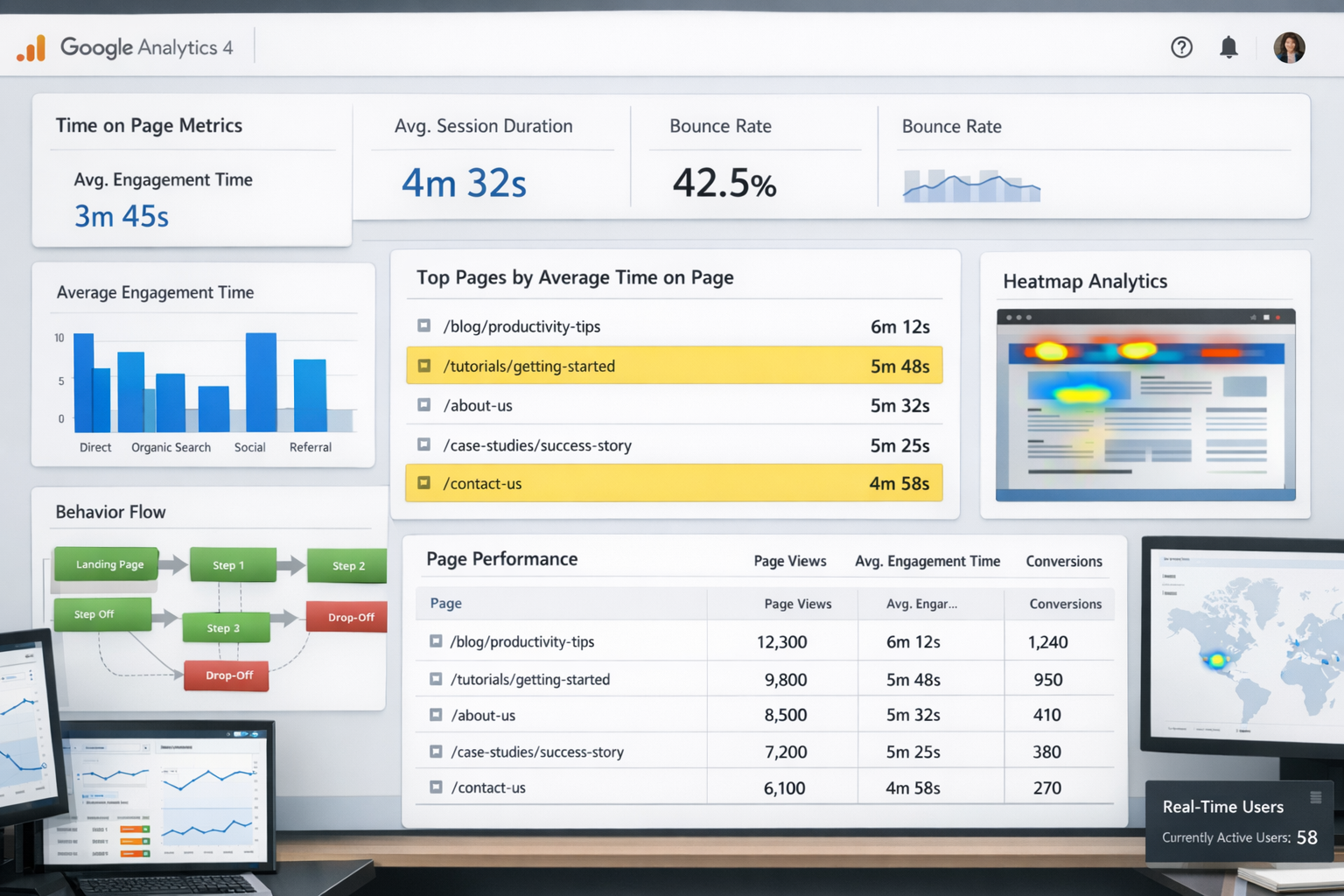
Most website owners make decisions based on gut feelings or page views alone.
That's like judging a restaurant by how many people walk through the door, not by how long they stay to enjoy their meal.
Time spent on pages reveals the real story. It shows which content genuinely engages your audience. A page with 1,000 views but 10-second average visits performs worse than a page with 100 views and 3-minute engagement times.
The business impact is direct:
- High-engagement pages indicate content that resonates
- Low engagement reveals pages that need improvement
- Time patterns show where visitors lose interest
- Engagement data guides content strategy decisions
Using Google Analytics 4 to Find Which Pages People Spend the Most Time On
Google Analytics 4 changed how we measure engagement in 2023. The old "time on page" metric disappeared, replaced by more accurate engagement measurements.
Setting Up Engagement Tracking
First, ensure your GA4 property is properly configured. Navigate to your analytics dashboard and verify data collection is active.
Key metrics to monitor:
- Average engagement time per session
- Engaged sessions per user
- Engagement rate
- Pages per session
Finding Your Top Engaging Pages
Here's the step-by-step process:
- Open Google Analytics 4
- Navigate to Reports ? Engagement ? Pages and screens
- Add the "Average engagement time" metric
- Sort by highest engagement time
The report shows exactly which pages people spend the most time on. But don't stop at the surface numbers.
Understanding the Data
Look for patterns in your top-performing pages:
Content patterns: Do how-to guides perform better than product pages?
Page length: Are longer pages keeping people engaged longer?
Media usage: Do pages with videos show higher engagement?
Call-to-action placement: Where do high-engagement pages place their CTAs?
Advanced GA4 Analysis
Create custom reports for deeper insights:
- Segment by traffic source to see which channels bring engaged visitors
- Compare mobile vs desktop engagement patterns
- Analyze by user demographics to understand audience preferences
- Track conversion paths from high-engagement pages
Alternative Tools for Tracking Which Pages People Spend the Most Time On
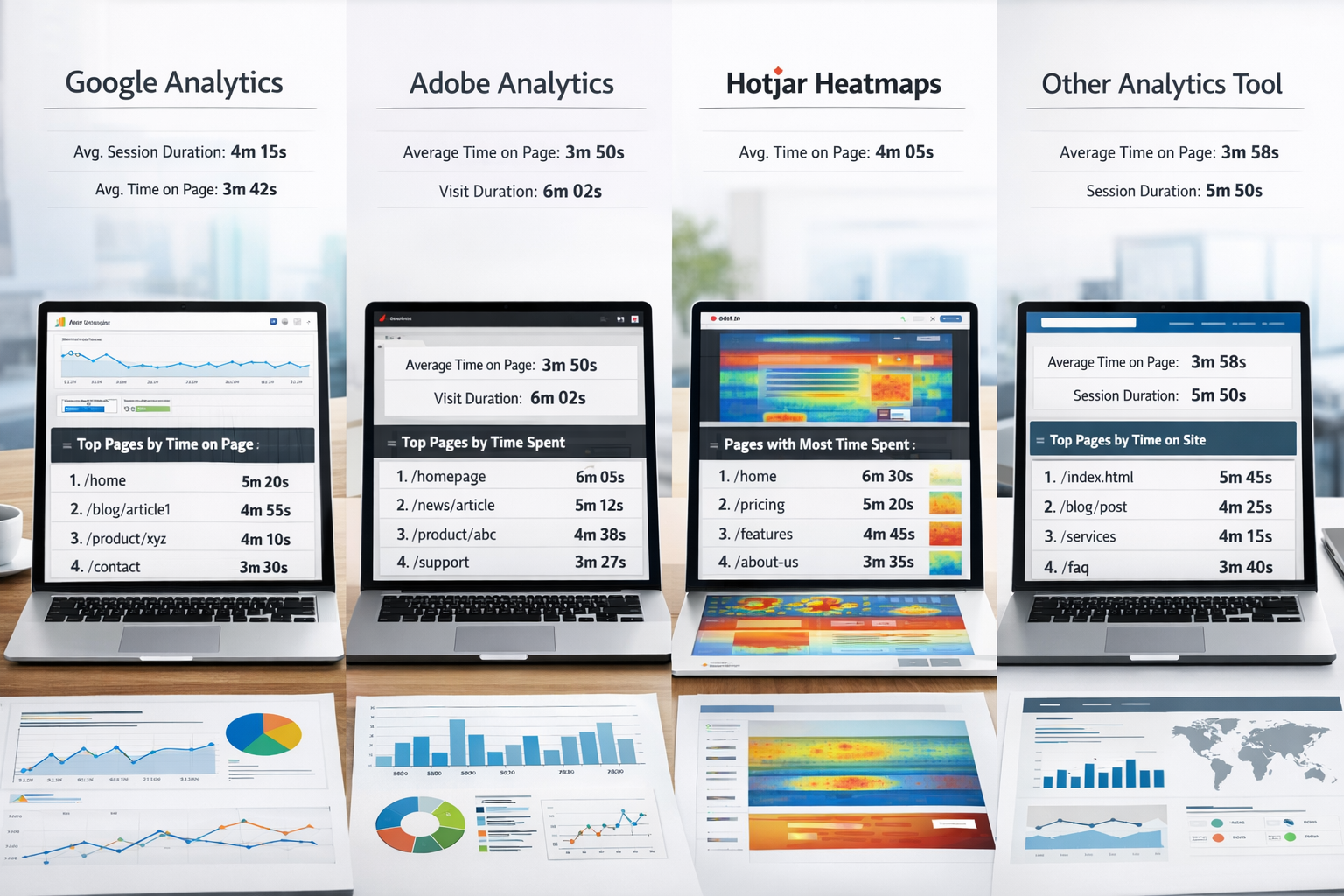
Google Analytics provides the foundation, but other tools offer unique insights into page engagement.
Hotjar for Visual Engagement Data
Hotjar shows exactly how visitors interact with your high-engagement pages.
Key features:
- Heatmaps reveal where visitors focus attention
- Session recordings show real user behavior
- Scroll maps indicate how far down pages visitors read
Install Hotjar on your top 10 pages by engagement time. The visual data explains why certain pages perform well.
Adobe Analytics for Enterprise Tracking
Larger businesses often need more sophisticated tracking than GA4 provides.
Adobe Analytics offers:
- Real-time engagement monitoring
- Advanced segmentation capabilities
- Custom engagement metrics
- Integration with marketing automation
Specialized Engagement Tools
Crazy Egg: Provides detailed heatmap analysis and A/B testing for engagement optimization.
Mouseflow: Offers session replay and form analytics to understand engagement drop-off points.
FullStory: Captures complete user sessions to analyze engagement patterns in detail.
Choosing the Right Tool Combination
Most successful businesses use multiple tools:
Small businesses: GA4 + Hotjar covers most needs
Medium businesses: GA4 + Hotjar + specialized tool for specific insights
Large enterprises: Adobe Analytics + multiple specialized tools
The key is starting simple and adding complexity as your needs grow.
Setting Up Cross-Platform Tracking
To get complete insights into which pages people spend the most time on:
- Implement GA4 as your primary tracking
- Add Hotjar to your top 20 pages
- Use specialized tools for specific challenges
- Create unified reporting dashboards
Each tool provides different angles on the same question: what keeps visitors engaged on your site?
Interpreting and Acting on Your Page Engagement Data
Raw data means nothing without proper interpretation and action.
Benchmarking Your Results
Good engagement times vary by industry:
- Blog posts: 2-4 minutes indicates strong engagement
- Product pages: 1-2 minutes shows genuine interest
- Service pages: 3-5 minutes suggests thorough consideration
- About pages: 1-2 minutes is typical for engaged visitors
Compare your results to these benchmarks, but focus more on relative performance within your own site.
Identifying Patterns in High-Engagement Pages
Look for common elements across pages where people spend the most time:
Content structure: Do they use similar heading patterns?
Visual elements: What images, videos, or graphics appear?
Word count: Is there an optimal length for your audience?
Internal linking: How do these pages connect to other content?
Optimizing Low-Engagement Pages
Pages with low engagement time need attention, not abandonment.
Quick optimization strategies:
- Improve page loading speed (slow pages kill engagement)
- Add relevant images or videos to break up text
- Restructure content using patterns from high-engagement pages
- Include internal links to related valuable content
- Test different headlines to improve initial engagement
Creating More High-Engagement Content
Use insights from pages which people spend the most time on to guide new content creation:
Content topics: What subjects generate the longest engagement?
Content formats: Do lists, how-tos, or case studies perform better?
Content depth: How detailed should new content be?
Visual requirements: What images or media enhance engagement?
Monitoring Changes Over Time
Engagement patterns change as your audience evolves and competition increases.
Monthly reviews should include:
- Top 10 pages by engagement time
- Biggest changes from previous month
- New pages entering the top performers
- Previously high-engagement pages losing traction
Set up automated reports to track these metrics without manual work each month.
Connecting Engagement to Business Results
High engagement means nothing if it doesn't drive business results.
Analyze the connection between:
- Pages with highest engagement and conversion rates
- Engagement time and customer lifetime value
- Content topics and lead quality
- Engagement patterns and customer retention
This analysis reveals which high-engagement pages actually contribute to business growth versus those that just consume time.
For more advanced tracking and optimization, consider exploring our comprehensive analytics solutions designed specifically for business owners who want actionable insights without complexity.
Conclusion
Knowing which pages people spend the most time on transforms how you approach content strategy and website optimization. Start with Google Analytics 4 to establish baseline engagement metrics, then layer in additional tools like Hotjar for deeper behavioral insights.
The real value comes from acting on this data consistently. Use engagement patterns to guide new content creation, optimize underperforming pages, and focus resources on what actually resonates with your audience.
Your next steps:
- Set up proper engagement tracking in GA4 today
- Identify your current top 10 pages by engagement time
- Analyze common patterns across high-performing content
- Create optimization plans for your lowest-engagement important pages
- Schedule monthly reviews to track changes and opportunities
Remember, engagement time is a means to an end, not the end itself. Focus on pages that combine high engagement with strong business results. Those pages represent your content sweet spot—the intersection of what your audience wants and what your business needs.
SEO Meta Title: How to Check Which Pages Get Most Time: Analytics Guide 2026
Meta Description: Learn exactly how to find which pages people spend the most time on using Google Analytics 4, Hotjar, and other tools. Complete guide with actionable steps.
Other frequently asked questions
- How Do I Check Which Pages People Spend the Most Time On
- How Do I Track Sales From My Google Ads Campaigns
- Will AI Take Over Data Analytics
- How Do I Track Phone Calls or Email Clicks as Conversions
- How Do I Track How Many People Fill Out My Contact Form
- How Do I Track How Many People Watch a Video or Download a Brochure
- How Do I Know Which Pages Lead to the Most Conversions
- How Do I See Where Most People Drop Off During Checkout
- How Do I See Where My Website Visitors Are Coming From
- How Do I See Which Blog Posts Bring Me the Most Visitors
- How Do I Check if My Homepage Is Actually Performing Well
- How Do I Find Out How Long It Takes Someone to Become a Customer
- How Do I Find Out What Paths People Take Before They Buy or Sign Up
- How Do I Measure Which Traffic Source Brings the Most Paying Customers
- How Do I See if Discounts or Offers Increase Sales
- How to See What Visitors Do First When They Land on Your Site