Google Ads for Builders: How to Get More Leads Without Wasting Budget
Most builders running Google Ads are losing money. Not because the ads don't work — because the setup was wrong before the first click ever happened.
Google Ads for builders can absolutely generate real leads, fast. But only when the ad, the landing page, and your tracking are all pulling in the same direction. Miss one of those three and you're just paying Google to test your website.
Here's how to get all three right.
Key Takeaways
- Send ad traffic to a dedicated landing page, not your main website
- Track every phone call and form submission as a conversion
- Start with one broad keyword and let the data show what works
- Use small jobs like decks to keep cash flowing while bigger projects develop
- Scale budget only after you know which search terms are converting
Why Most Builder Ad Campaigns Fail
I've had builders come to me convinced their ads were broken. Good traffic, real spend, zero leads.
Pull up the data and the problem shows up fast, usually inside a minute.
Their ads were sending people straight to the main website — navigation, a photo gallery, an about page, links going everywhere. Land there after clicking an ad and you've got six places to go that aren't "call this builder." So people leave.
The ad was fine. The destination was the problem.
I see this constantly with Google Ads for builders.
The Landing Page Fix
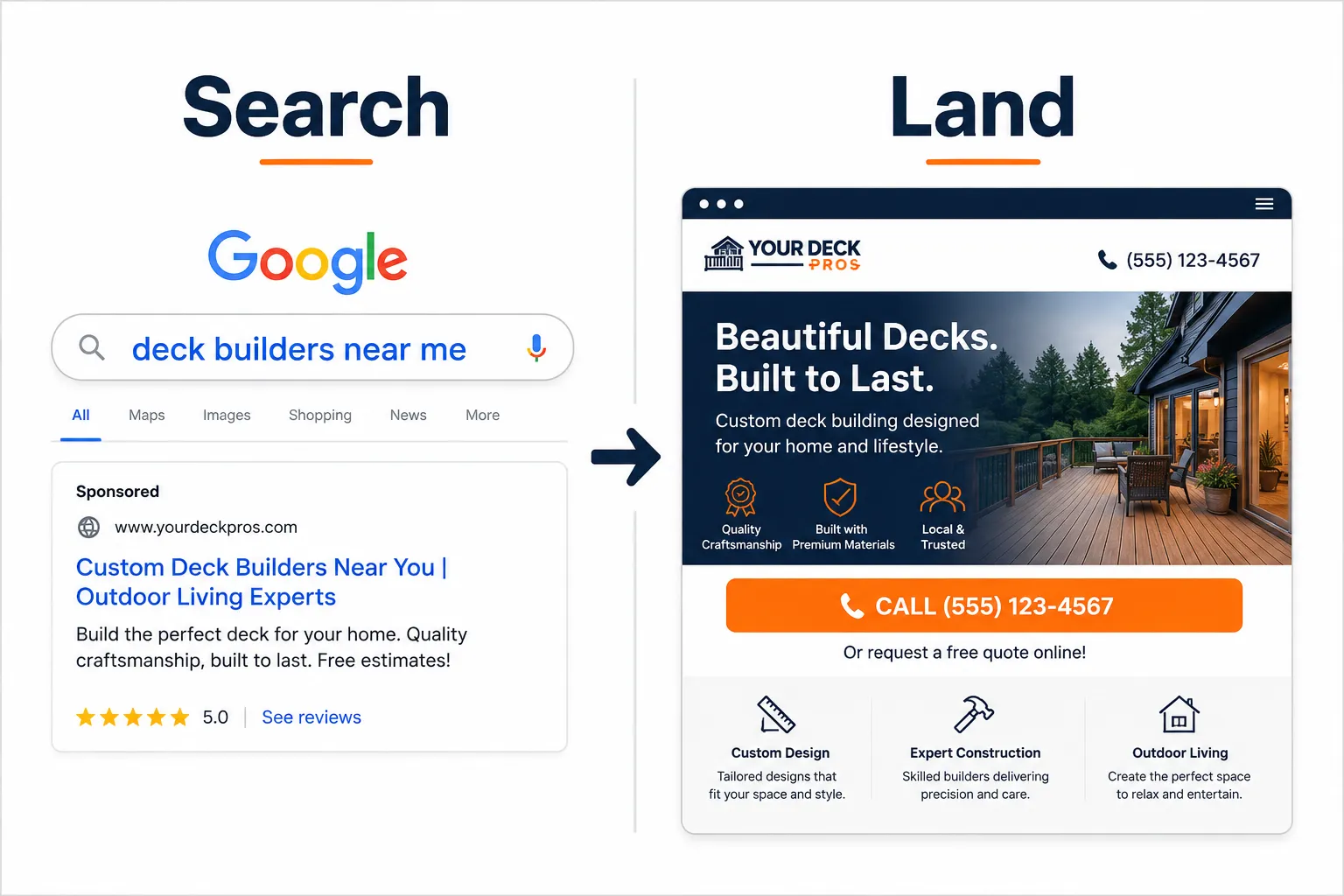
A landing page isn't your website. It's one page, built to do one thing — turn a visitor into a lead. Nothing else on it matters.
Here's what it actually needs:
- Logo top left so people know who you are
- Phone number that is tracked and clickable on mobile
- Contrasting call-to-action button, if your brand is blue, make the button orange
- Clear headline that matches the ad (if the ad says deck builders in Auckland, the page says deck builders in Auckland)
- Before and after photos of your work
- Google review screenshots as social proof
- Simple form at the bottom, first name, email, job type, location
When someone fills out the form, send them to a thank-you page. That page is your tracking — anyone who lands on it is a conversion, full stop.
Simple. Clean. It works.
"If your ad is about black cats, it should arrive on a page with black cats."
How to Structure Google Ads for Builders
Most builders set this up too complicated, too early — segmented campaigns and precise targeting before they've got a single data point to work from.
Here's the three-month process that actually works, and it's simpler than what most agencies will sell you.
Month 1: Discovery
Start with one broad search term. Something like "builders in [your city]."
Don't go narrow yet. Let Google gather data first. You'll get leads this month, sure, but the real value is the search term data coming in — that's what tells you what to do next.
Month 2: Focus
Pull your search terms report. Not keywords — search terms, the actual words people typed before they clicked your ad.
Find the ones that turned into leads. Build a landing page for each. Set up a separate ad group targeting each one.
Month 3: Scale
Now you actually know what works. Increase your daily budget. Add negative keywords for anything that didn't convert. You're spending more, but only on what's already proven, not a guess.
This is how Google Ads for builders goes from a money pit to a lead machine [6].
Decks, Fences, and Small Jobs Are Not Small Opportunities
Here's something most builders overlook.
Small jobs — decks, fences, pergolas — are fast cash. They keep the crew busy while the bigger house builds sit in planning or wait on permits.
They also convert faster in Google Ads. Someone searching "deck builder near me" is usually ready to move now, not in six months. Lower cost per click, shorter sales cycle, money in the door fast.
Use small jobs to fund the pipeline while the bigger projects come together.
Set up a separate campaign for small residential work. Different landing page, different search terms, same three-month process.
That data is useful beyond ads too — if "deck builder [suburb]" converts well as a paid term, it'll likely do well in organic search as well [8].
What Has Changed in Google Ads in 2026
A few things worth knowing if you're running ads right now.
Google's AI automation is now the default setting across campaigns [10]. Translation: the platform is making more decisions for you automatically. That means you need to watch your numbers more closely, not less — don't just set it and walk away.
New transparency labels are now required on ads, showing how the ad was created [1]. Minor change for most builders, but worth knowing about.
Google Ads API v25 launched in July 2026, with updates to how conversion goals are structured [4]. If someone else manages your account, make sure they're across this — it affects how your leads get counted and optimised.
The One Thing That Kills Results
Missing calls.
A tracked phone number is worthless if nobody picks it up.
I've seen builders with a genuinely good setup — ads working, calls coming in — lose the lead anyway because they were on-site and missed the call. Call back a few hours later and the prospect has already booked someone else.
Pick up the phone. Every time.
If that's not realistic, get a receptionist or an answering service. It costs nothing compared to what a missed lead is worth.
Conclusion
Google Ads for builders works. It just only works when the whole system — ad, landing page, tracking — is set up right.
Start with a proper landing page. Track everything. Run one broad campaign first and let the data do the talking. Use small jobs like decks to keep revenue flowing while you wait on bigger builds. Then scale what's already proven.
Three things to check this week:
- Check where your current ads are sending traffic, website or landing page?
- Confirm you are tracking phone calls and form submissions as conversions
- Pull your search terms report and see what people are actually typing
The data's already sitting there. It just needs to actually get used.
Bonus: Builder Lead Budget Estimator
Want a rough idea of what your ad budget could generate? Plug in your numbers below — it's based on typical construction CPC and conversion rates.
Builder Lead Budget Estimator
Estimate how many leads your Google Ads budget could generate.
Estimated clicks:
Estimated leads:
Approx. cost per lead:
References
[1] Weekly Digital Marketing Dispatch Final Week Of July 2026 - https://bostoninstituteofanalytics.org/blog/weekly-digital-marketing-dispatch-final-week-of-july-2026/
[4] ads-developers.googleblog - https://ads-developers.googleblog.com/2026/07/?m=0
[6] Google Ads Updates July 2026 - https://redeggmarketing.com/google-ads-updates-july-2026/
[8] Google Ads Updates 2026 - https://hawky.ai/blog/google-ads-updates-2026
[10] Ad Platform Updates 2026 - https://theadspend.com/blog/ad-platform-updates-2026
Tags: Google Ads for builders, builder lead generation, construction Google Ads, landing pages for builders, small builder jobs, deck builder advertising, Google Ads lead tracking, paid search construction, builder marketing 2026, conversion tracking builders